

Role: Lead UX Designer
Duties: Field research, stakeholder alignment, interaction design, user flows, UI handoff
The Problem
NAPA's delivery operation ran on paper and memory. Drivers carried clipboards. Dispatchers managed physical boards of keys and invoices. The moment a truck left the lot, the dispatcher had nothing until it came back.
Digitizing that sounds like a technology problem. The real problem was the people doing the work. Drivers were retirees and part-timers who'd been running the same routes for years. They knew which delivery bays had broken buzzers, which customers only showed up after 10am, which back entrances actually worked. None of that lived in any system. It lived in their heads, and paper worked fine for that. Any tool that added steps, demanded attention while driving, or felt like someone watching over their shoulder was going to end up on the seat and stay there.
The actual design problem: build something digitization requires without building something the users refuse to use.
The Research
I did ride-alongs. That's where you find out what's actually happening instead of what the brief says is happening.
What I saw: drivers juggling coffee, keys, and a clipboard while running routes they had completely memorized. The paper manifest was mostly a formality. The real route lived in their heads, stop order, customer quirks, who to call if no one was at the dock, years of accumulated knowledge that had never once been written down.
Dispatchers had a separate problem. Once a truck left, they went blind. A priority customer calling to ask where their part was left the dispatcher with two options: call the driver, which drivers hated, or guess. They had a name for it already. They called it the black hole.
Two users, two distinct problems, one tool that had to work for both.
The Pivot
The original brief called for a delivery management app where drivers logged every step: arrived, unloading, signed, departed, four taps per stop, every stop, all day.
One week of research made it clear that wasn't going to survive contact with the actual users. These drivers weren't going to tap through a four-step confirmation flow standing at a loading dock. The tool would get ignored, and the data the business wanted would never materialize.
The harder conversation was with stakeholders. Those manual input fields were tied to reporting requirements, which meant cutting them meant going back to leadership and making the case plainly: a tool with zero adoption produces zero data worth having. We moved from a data-input model to a background utility, passive tracking, automated status updates, the driver's interaction with the app kept minimal by design.
Hard Decisions
Stakeholders wanted continuous location tracking. Research said drivers who felt watched would reject the tool outright. The compromise was contextual tracking, active only during a live route, visible to the driver on their own screen, so they could see exactly what was being shared and when it stopped.
That transparency did real work. This was a user population with real reasons to distrust new technology, and showing them exactly what the app knew, and when it stopped knowing it, kept them from writing the whole thing off as surveillance.
The first prototype was map-first, familiar from consumer apps, easy to defend in a design review. It failed immediately in testing. These drivers knew their areas cold. A map gave them nothing they didn't already have memorized. What they actually needed was the manifest, confirmation that the right parts were on the truck for the right stop.
I flipped the hierarchy. A single, context-aware card. Driving showed next-stop details. Arriving surfaced the scan button, front and center. The driver never had to decide what to do next. The app showed them the one thing that mattered at that exact moment.
The Dispatcher Side
The other half of the tool is the side dispatchers actually live in: building routes, assigning drivers, tracking status in real time, and closing the loop with proof of delivery once a stop is complete.
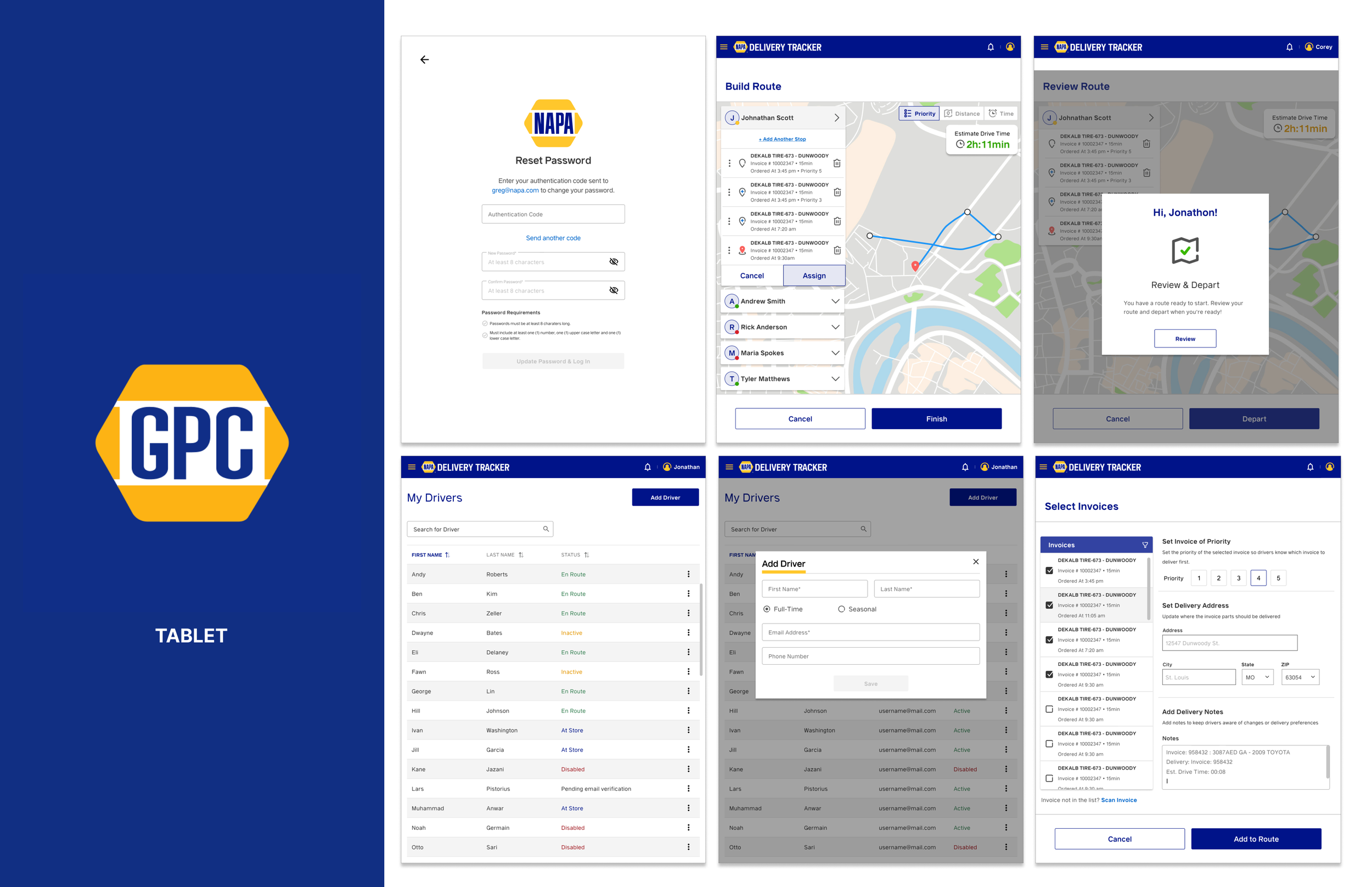
Route Builder lets a dispatcher assign stops by priority, distance, or time, add drivers to a route, and see a live estimated drive time before anything ships. The invoice-selection screen sets delivery priority per stop and captures delivery notes drivers actually need, changed access instructions, a preferred contact, anything that used to live only in someone's head.

On the desktop side, the driver roster shows live status across the whole team, en route, on site, away, offline, with a route detail panel for any driver selected. The proof-of-delivery view closes the loop dispatchers used to have none of: exact delivery time, quantities delivered per invoice, confirmed against what was ordered. That single screen is the direct answer to the black hole, the dispatcher no longer has to call the driver or guess.
The Outcome
Dispatchers got real-time visibility into driver status during active routes. The black hole closed.
Drivers called the tool easier than the clipboard, not because it had more features, because it had fewer decisions. The app handled the steps that used to require attention and got out of the way for everything else.
Automated status updates cut the check-in calls drivers had always hated. A tool built to increase management visibility ended up reducing the most intrusive form of it instead.
What I'd Tell the Next Person Doing This
That outcome only happens when the research shapes the design instead of the brief shaping the research. The original spec asked for more data capture, more logging, more visibility for management. Every ride-along said the opposite: less friction, less attention required, less of a feeling of being watched. Following the brief would have shipped a tool nobody used. Following the drivers shipped one they kept.